21.10.14
vscode sass compile 하기
- vscode 확장 프로그램 "Live Sass Compiler" 설치
- scss 파일면 vscode 우측 하단에 "watch Sass"이 보인다.
- settings.json 설정
- 참고
  "liveSassCompile.settings.generateMap": false,
  "liveSassCompile.settings.includeItems": ["css/scss/test.scss"],
  "liveSassCompile.settings.formats": [
    {
      "format": "expanded",
      "extensionName": ".css",
      "savePath": null
      // "format": "compressed",
      // "extensionName": ".min.css",
      // "savePath": "~/../css/"
    }
],21.10.11
prevent scrolling css code example
- newebdev Example 1: disable scroll css
/* Answer to: "disable scroll css" */

/*
  You must set the height and overflow of the body, to disable
  scrolling.
*/

html, body {
  margin: 0;
  height: 100%;
  overflow: hidden
}
Example 2: javascript disable scrolling on body
document.body.style.overflow = 'hidden';Example 3: css how to prevent horizontal scrolling
body {
    overflow-x: hidden !important;
}
.container {
    max-width: 100% !important;
    overflow-x: hidden !important;
}
Example 4: css how to prevent horizontal scrolling
html, body {
    max-width: 100%;
    overflow-x: hidden;
}
Example 5: css prevent background scrolling
<body scroll="no" ></body>
or css

background-attachment: fixed;
Element.insertAdjacentHTML()
21.10.10
onclick() and onblur() ordering issue
  - 검색 input에 blur이벤트, 검색 결과layer에 click이벤트를 등록 시켜 놨을때
  - blur 이벤트가 먼저 동작함으로 layer를 클릭하지 못하는 이슈가 있었다.
  - click 이벤트를 먼저 동작 하게 하기 위해서 조사 진행
  - mousedown이벤트가 blur이벤트 보다 먼저 trigger되어 prevent 해줄 수 있는 해결 방법을 아래 참고 자료를 통해서 알게 됐다.
  - mousedown에서 event.prevetDafault를 진행.
      - [stackoverflow](https://stackoverflow.com/a/57630197/3937115)
      - [blog](https://newbedev.com/onclick-and-onblur-ordering-issue)
21.10.08
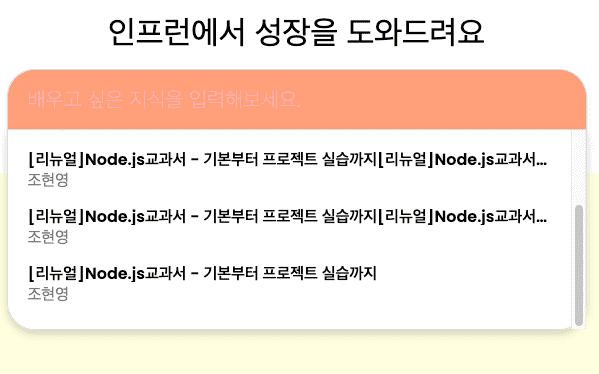
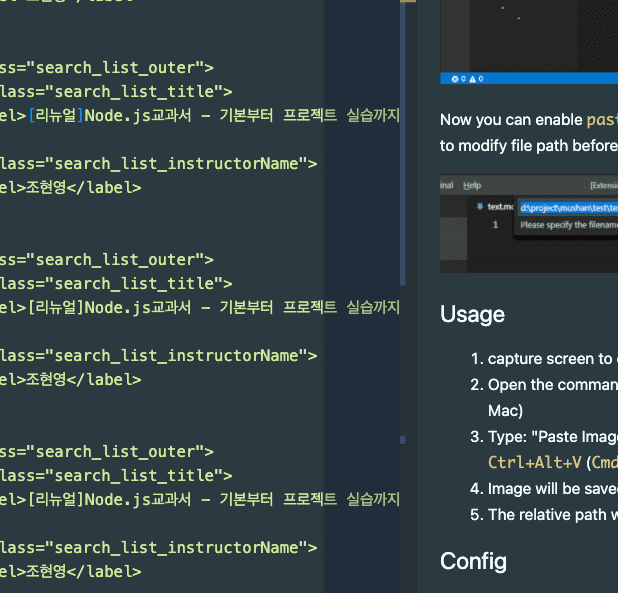
scrollbars respect the border-radius of elements?
-
문제 화면
-
-
결과 화면
-
- 수도코드 "::-webkit-scrollbar-track"에 margin-bottom을 주는게 모양이 좋다. stackoverflow stackoverflow stackoverflow
.search_view_cover::-webkit-scrollbar-track {
  margin-bottom: 20px;
}
Styling Scrollbars with CSS in All Modern Browsers
constructor에서는 async 키워드가 적용 안된다
- constructor에서 async 키워드가 적용된다.
-
아래 홈페이지 참고
- Approach 2 - Use async initializer() method 항목을 참고 함.
- https://bytearcher.com/articles/asynchronous-call-in-constructor/
-
아래 참고해서 개선해보자 - 211008(금)
class MyClass {
  constructor() {
     //static initialization
  }

  async initialize() {
     await WhatEverYouWant();
  }

  static async create() {
     const o = new MyClass();
     await o.initialize();
     return o;
  }
}
Then in your code create your object like this:

const obj = await MyClass.create();
21.10.06
-
popstate eventListener
-
event trigger
- 사용자가 마지막으로 방문한 페이지의 항목을 이전, 다음 이동시
- history.pushState()
window.addEventListener('popstate', router); -
-
History.pushState()
- mdn
- 브라우저 세션 기록 스택에 항목을 추가
-
Object.fromEntries()
